4.0.0 Pre Release Notes
Version 4.0.0 is a major release that modernizes the plugin's PHP and JavaScript architecture, and removes a significant amount of legacy code. This page covers what changed, what was removed, and what action may be required for merchants or developers with custom integrations.
4.0.0 is currently in release candidate. The latest pre-release version is 4.0.0-rc.1. If you are participating in the testing of this release candidate, please report any issues on the GitHub Issue Tracker before the final release.
New Features
Google Pay No Longer Requires a Merchant ID
The Google Pay gateway no longer requires a Google Merchant ID or approval from the Google API team. Stripe's latest Google Pay integration handles merchant verification directly, so any store with a Stripe account that supports Google Pay can accept Google Pay payments immediately without any application or setup process.
If you are already accepting Google Pay today, nothing changes — your existing setup continues to work as-is.
The Payment Request Gateway has been deprecated as a result. See Deprecated for details.
Apple Pay & Google Pay: New "Checkout" Payment Section
The Payment Sections setting on the Apple Pay and Google Pay settings pages has a new Checkout option. Adding Checkout to this list controls whether the payment method appears in the payment methods section of the checkout page — separate from the express checkout row at the top. Previously, these gateways would always appear in the payment methods list on the checkout shortcode with no way to disable it.
This works consistently across both the classic checkout shortcode and the WooCommerce checkout block.

The Payment Sections setting on the Apple Pay settings page. Adding Checkout enables the payment method to appear in the payment methods section of the checkout page.
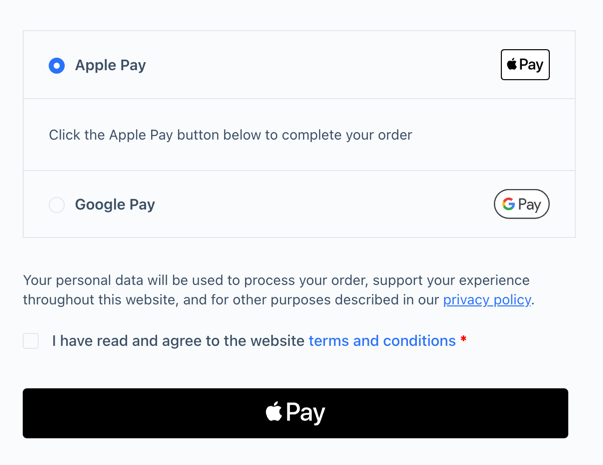
Apple Pay and Google Pay rendering in the payment method section.
Apple Pay & Google Pay in the Universal Payment Method
Apple Pay and Google Pay are now supported within the Universal Payment Method (UPM) integration. When a customer uses Apple Pay or Google Pay inside the UPM Payment Element, the payment is routed to the correct child gateway (stripe_applepay or stripe_googlepay) and processed accordingly.
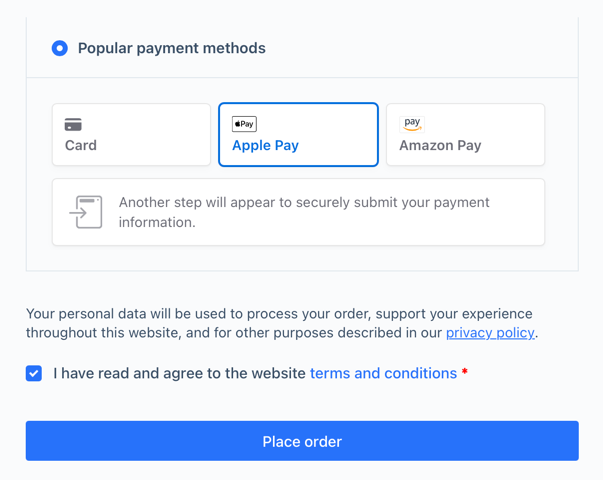
Apple Pay as a payment option in the UPM.
Unified BNPL Messaging
Buy Now Pay Later messaging for Klarna, Afterpay, and Affirm is now rendered through a single unified Stripe paymentMethodMessaging element. Previously, each payment method rendered its own separate messaging element. The unified element renders all supported BNPL methods together, which is how Stripe designed the current API to work.

Buy Now Pay Later messaging rendering on the product page.
BNPL messaging now also responds to product add-on plugins. When a customer selects an add-on that changes the product total, the messaging element updates dynamically to reflect the new amount. Supported plugins include WooCommerce Product Add-Ons, Advanced Product Fields for WooCommerce, and Extra Product Options & Add-Ons.
BNPL Location Settings Moved
The location settings that control where BNPL messaging appears (product page, cart, shop, checkout) have been moved to the Advanced Settings page. Because messaging is now unified across all BNPL gateways, it no longer makes sense to manage location settings per-gateway. Whether to show messaging at all is still controlled on each gateway's individual settings page.
Native Installment Rendering (Mexico & Brazil)
For merchants with Stripe accounts in Mexico or Brazil, installment options are now rendered natively inside Stripe's Payment Element iframe. The previous implementation used a custom HTML dropdown that the plugin maintained entirely — custom markup, CSS, and plan-fetching logic. That code has been removed.
Because installments now render inside the Stripe iframe, there are no theme styling conflicts. The Stripe Payment Form card form type is required. Installments are not supported with the inline card element.
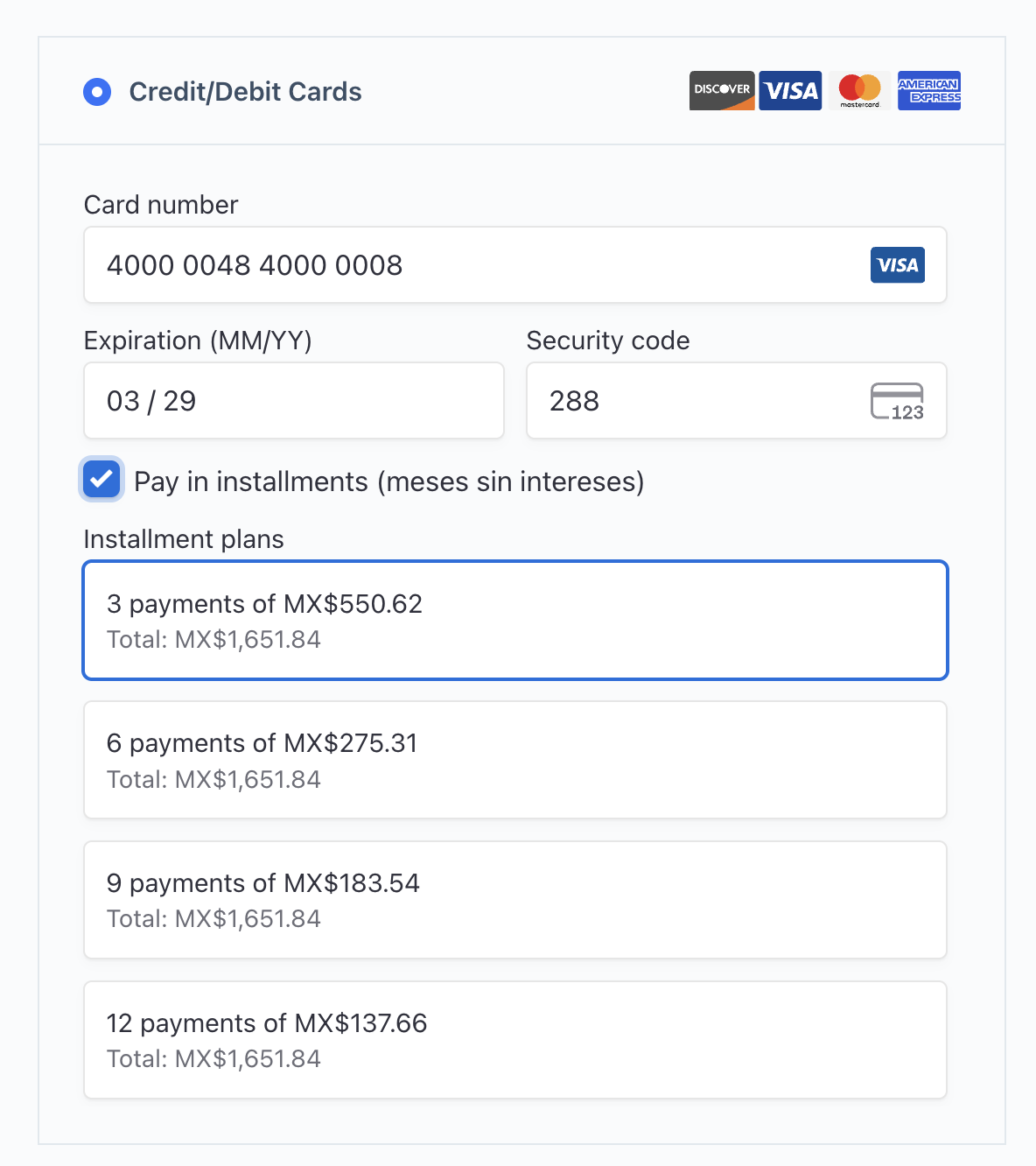
The new installment integration using the Stripe payment form.
WooCommerce Mini Cart Support
Version 4.0.0 adds support for the new WooCommerce mini cart, which is built on WordPress's Interactivity API. Apple Pay, Google Pay, and Link Checkout express payment buttons now render correctly inside the side cart, giving customers the same one-tap payment experience they get on the cart page.
To our knowledge, this is the only Stripe plugin for WooCommerce that currently supports express payment buttons in the new side cart.
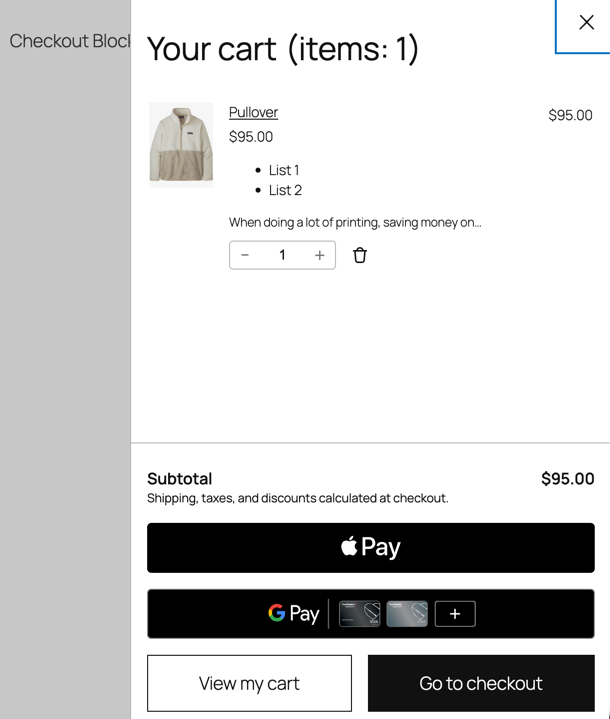
Apple Pay and Google Pay rendering inside the WooCommerce side cart.
Saved Payment Method UX Redesign
The saved payment method UI has been rebuilt. Previously, saved cards were displayed as a nested dropdown inside the Credit/Debit Cards payment method row. The new design presents each saved card as an individual row at the same level as other payment options. The most recently used card is shown by default, with a See more link to expand the full list. Selecting a card collapses the list back to show only the chosen method.
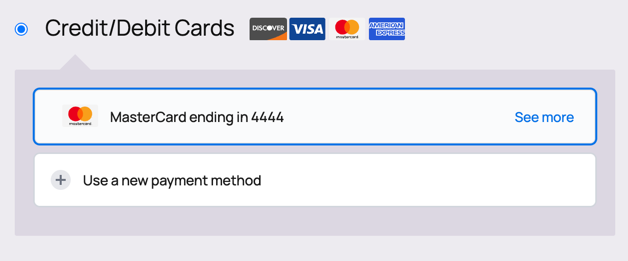
Saved payment methods rendered on the checkout page
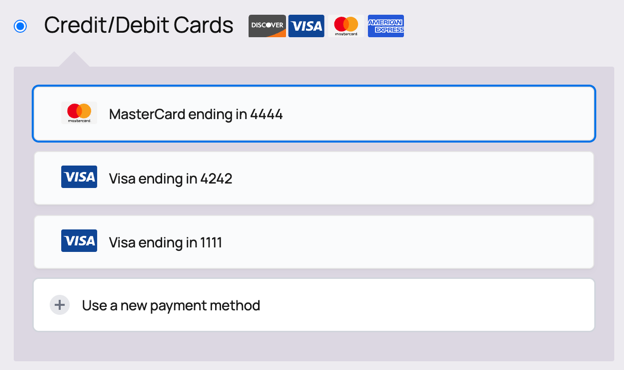
The expanded list of saved payment methods
Architecture Changes
New Namespace: PaymentPlugins\Stripe
All new PHP classes in 4.0.0 use the PaymentPlugins\Stripe namespace. This eliminates the risk of class name conflicts with other plugins or themes that may define classes with the same names. Existing classes in the includes/ directory retain their original names for backward compatibility.
All Scripts Now Built with Webpack
All frontend JavaScript is now built through webpack and output to assets/build/. Previously, the plugin used a mix of webpack-built scripts and older ES5 scripts written in the prototype pattern. Having both approaches in the same codebase made it impossible to fully optimize script delivery.
With a unified build system, each page context (product, cart, checkout) receives its own lean bundle containing only the code that page requires. Shared modules are bundled once and reused across entry points.
If you use a caching plugin, clear your cache after updating so the new script paths are served correctly.
New JavaScript Data Globals
Client-side data is now output through a single centralized JavaScript object instead of per-gateway variables:
wcStripeSettings— Static configuration data: gateway settings, payment method capabilities, customer data, required fields, and other page-load data. Previously, each gateway had its own JavaScript variable —wc_stripe_params_v3,wc_stripe_credit_card_params,wc_stripe_applepay_checkout_params, and so on. All of those properties are now consolidated intowcStripeSettings.
If you have custom JavaScript that reads data from the old per-gateway variables, update it to read from wcStripeSettings.
REST Routes Relocated to src/Rest/Routes
All REST endpoint logic has been moved to src/Rest/Routes/. The classes that previously lived in includes/controllers/ have been removed. If any custom code references those controller classes directly, those references will need to be updated to the new locations.
Webhook URLs are unchanged. Existing webhooks configured in your Stripe dashboard will continue to work without interruption.
Stripe API Version Bump
The plugin's Stripe API version has been updated from 2022-08-01 to 2026-02-25.clover. This applies to all API requests the plugin makes on your behalf.
Existing webhooks will continue to work as-is — Stripe delivers webhook events using the API version that was active when the webhook endpoint was created. There is no requirement to recreate your webhooks. If you do want your webhooks to use the new API version, you would need to delete and recreate the webhook endpoint. See Creating a Webhook for instructions.
Container / Dependency Injection
A dependency injection container (PaymentPlugins\Stripe\Container\Container) now manages service instantiation. Gateway classes receive their dependencies (payment controller, API client, assets) via constructor injection rather than instantiating them internally.
The global function wc_stripe_get_container() provides access to the container from outside the plugin's own code:
$client = wc_stripe_get_container()->get( \PaymentPlugins\Stripe\Client\StripeClient::class );
Breaking Changes
CSS Selector Changes
The IDs and classes on payment button container elements have changed across all template files. The changes serve two purposes: the prefix separator was changed from a hyphen to an underscore to clearly delineate the prefix from the gateway ID, and the page context is now included in the selector name so it's clear which page a given element belongs to.
Apple Pay
| Location | Old | New |
|---|---|---|
| Product page | #wc-stripe-applepay-container | #wc-stripe_applepay-product-button |
| Cart page | #wc-stripe-applepay-container | #wc-stripe_applepay-cart-button |
| Mini-cart | .wc-stripe-applepay-mini-cart | .wc-stripe_applepay-mini-cart |
| Checkout page | .wc-stripe-applepay-button | #wc-stripe_applepay-checkout-button |
Google Pay
| Location | Old | New |
|---|---|---|
| Product page | #wc-stripe-googlepay-container | #wc-stripe_googlepay-product-button |
| Cart page | #wc-stripe-googlepay-container | #wc-stripe_googlepay-cart-button |
| Mini-cart | .wc-stripe-gpay-mini-cart | .wc-stripe_googlepay-mini-cart |
| Checkout page | .gpay-button-online-api-id-checkout | #wc-stripe_googlepay-checkout-button |
If you have custom CSS or JavaScript targeting any of these selectors, update them to the new values.
REST Controller Classes Removed
The following classes previously in includes/controllers/ have been removed and replaced by src/Rest/Routes/. Any code that instantiates or extends these classes will produce a fatal error.
WC_Stripe_Controller_CartWC_Stripe_Controller_CheckoutWC_Stripe_Controller_Gateway_SettingsWC_Stripe_Controller_GooglePayWC_Stripe_Controller_Order_ActionsWC_Stripe_Controller_Payment_IntentWC_Stripe_Controller_Payment_MethodWC_Stripe_Controller_Product_DataWC_Stripe_Controller_SourceWC_Stripe_Controller_Webhook
Deprecated
Payment Request Gateway
When the plugin was released in 2019, Stripe's payment request button integration was the way to offer Google Pay through Stripe without going through Google's API approval process. However, that integration had drawbacks — browser support was limited and it lacked features that a direct integration provided. To fill that gap, the plugin also offered a separate Google Pay Gateway, which used a direct Google Pay integration but required merchants to apply to Google, receive a Merchant ID, and configure it manually.
In 2026, Stripe's native Google Pay integration is fully featured and no longer requires a separate approval process or Merchant ID. With both gateways now offering the same capabilities, there is no reason to maintain two separate options. The Payment Request Gateway has been retired, and the Google Pay Gateway now uses Stripe's native integration — giving merchants the full feature set with none of the setup overhead.
On update, existing stores are migrated automatically. The Google Pay gateway replaces the Payment Request Gateway at checkout with no visible change to the customer experience.
The stripe_payment_request gateway still exists in the plugin but will not show on frontend pages or the admin dashboard. Existing subscription renewals and recurring payments will continue to process without interruption but will be processed through the Google Pay gateway. All new Google Pay purchases by customers will go through the stripe_googlepay gateway going forward.
WC_Stripe_Field_Manager
WC_Stripe_Field_Manager is deprecated in 4.0.0 and replaced by PaymentPlugins\Stripe\Checkout\ExpressCheckoutRenderer. The new class handles rendering HTML containers for express payment buttons (Apple Pay, Google Pay, Link, etc.) on product, cart, mini-cart, and checkout pages. WC_Stripe_Field_Manager remains functional but delegates internally to ExpressCheckoutRenderer and will be removed in a future version.
Gateway Methods
The following methods on WC_Payment_Gateway_Stripe are deprecated as of 4.0.0 and will be removed in a future version. They remain functional but will trigger deprecation notices.
Display item methods — replaced by AssetDataController:
| Deprecated method | Reason |
|---|---|
get_display_item_for_cart() | Data now output via wcStripeSettings.cart (AssetDataController → DataTransformer) |
get_display_item_for_order() | Data now output via wcStripeSettings.cart (AssetDataController → DataTransformer) |
get_display_item_for_product() | Data now output via wcStripeSettings.cart (AssetDataController → DataTransformer) |
get_formatted_shipping_method() | Data now output via wcStripeSettings.cart (AssetDataController → DataTransformer) |
Script enqueue methods — replaced by the new FrontendScripts architecture:
| Deprecated method |
|---|
enqueue_frontend_scripts() |
enqueue_checkout_scripts() |
enqueue_cart_scripts() |
enqueue_product_scripts() |
enqueue_mini_cart_scripts() |
enqueue_add_payment_method_scripts() |
enqueue_payment_method_styles() |
Gateway Property Names
Several properties on gateway classes have been renamed. The old names are still accessible via the __get() magic method in AbstractLegacyGateway and remain functional, but should be updated:
| Old property | New property | Reason |
|---|---|---|
$gateway->payment_object | $gateway->payment_controller | payment_object was never descriptive of what the class does. payment_controller better reflects its role: managing and controlling the payment process. |
$gateway->gateway | $gateway->client | gateway was confusing because the term already refers to payment gateways in WooCommerce. This property is a Stripe API client — a class that makes requests to Stripe's servers — so client is the more accurate name. |
$gateway->token_key | $gateway->payment_method_id | token_key was used to store the payment method ID created during the checkout process. payment_method_id is more accurate and self documenting. |
$gateway->saved_method_key | "wc-{$gateway->id} . '-payment-token"' | This was the key used to identify a customer's saved payment method. The plugin now uses the WooCommerce core naming convention which consists of the prefix "wc-" + $gateway_id + "-payment-token" |
$gateway->save_source_key | "wc-{$gateway->id}-new-payment-method" | This was the key used to indicate the customer wanted to save their payment method. We've now updated the plugin to use the WooCommerce core naming convention. |
$gateway->payment_intent_key | n/a | The use of the payment_intent_key has been deprecated. |
$gateway->new_source_token | $gateway->payment_method_id | Use the payment_method_id now |
The mapping is implemented in AbstractLegacyGateway::__get():
public function __get( $key ) {
    if ( $key === 'payment_object' ) {
        return $this->payment_controller;
    } elseif ( $key === 'gateway' ) {
        return $this->client;
    } elseif ( $key === 'token_key' ) {
        return $this->id . '_token_key';
    } elseif ( $key === 'saved_method_key' ) {
        return $this->id . '_saved_method_key';
    } elseif ( $key === 'save_source_key' ) {
        return "wc-{$this->id}-new-payment-method";
    } elseif ( $key === 'payment_intent_key' ) {
        return $this->id . '_payment_intent_key';
    } elseif ( $key === 'new_source_token' ) {
        return $this->payment_method_id;
    }

    return null;
}
New Filters
| Filter | Description |
|---|---|
wc_stripe_bnpl_message_gateways | Filters which gateways are included in unified BNPL messaging. Allows customization of the conditions under which messaging renders. |
wc_stripe_bnpl_shop_message_gateways | Per-product filter applied in the shop/category page loop. Allows product-type-specific filtering of BNPL messaging. |
wc_stripe_add_script_data | Add or modify data output to the wcStripeSettings JavaScript object. |
wc_stripe_cart_data | Filter the cart data that's part of the wcStripeSettings.cart object. |